 ReviewFold
Comparison · AppFollow
An AppFollow alternative for review analysis, not a replacement for your ASO workflow
If your immediate question is what users keep struggling with, start with a focused review report. ReviewFold does not replace app-store keyword tracking or a customer-support inbox.
This page is written by the team that builds ReviewFold. We are not an independent reviewer, and we did not run a hands-on test of AppFollow’s current build. Its column summarizes AppFollow’s own public documentation; check your plan on appfollow.io/pricing before deciding.
- Stores
- App Store US/CA · Google Play US
- Sample
- Up to 200 recent public reviews
- Per report
- One app, one region
- Tracking
- One app, checked daily
- Replies & ASO
- Not offered
These are current product limits, not roadmap items. A report reads public reviews for the app and region you submit. It does not read private analytics, support tickets, other regions, or store keyword rankings.
01 · Three routes
Most teams do not need a different suite. They need one more answer.
AppFollow is a review operations platform: replies, keyword tracking, multi-app dashboards. If one of those is failing you, a report will not fix it. Pick the route that matches your actual gap, not the one that sounds cheapest.
Keep the suite, add one report
Use AppFollow for replies, alerts and store keywords. Run a ReviewFold report when you need to read a sample closely and quote the reviews. Two tools, one job each.
Replace only the analysis step
Your team never replies from a tool and does not track keywords. You wanted recurring themes with the original text, and the suite was more surface than you used.
Start free, decide later
Your app, one store, this month. The store console already groups topics at no cost. Only pay once the question is about a specific problem or someone else’s app.
None of these routes requires cancelling anything. Route 01 is the one we would recommend most often for a team already paying for an operations suite.
02 · Task coverage
Four tools touch this work. Each one owns a different part.
The useful question is not “which product is better” but “which task do I have this week, and what already covers it”. The free store consoles are in this table because leaving them out would flatter every vendor on the page.
| Job to be done | AppFollowOps suite | ReviewFoldOne report | Store consoleFree |
|---|---|---|---|
| Group recent reviews into recurring themes | Part of its review product; confirm how themes are produced | Yes — up to 200 recent reviews | Yes for your own app, as topic groupings |
| Read the original review behind a themeThe step that decides whether a theme means what it looks like. | Yes | Yes — excerpts stay in the report | Yes for your own app only |
| Reply to reviews from a shared inbox | Yes — reply tooling is central to the product | Not offered | One at a time, per store; no shared inbox |
| Store keyword and ranking tracking | Yes — sold as its own ASO line | Not offered | Not a rank tracker |
| Be told when new reviews arrive | Part of the product; packaging varies by plan | One tracked app: daily check, Monday email | No — you check manually |
| Study a competitor’s reviews | Competitor slots are separate from your own app; confirm review analysis on your plan | Yes — run the same report on their public link | No |
| Keep an exportable record | Export options vary by plan | PDF and review CSV; reports stay in your account | Play Console exports a monthly review CSV for your own app; no one-click export for a competitor |
Group reviews into themes
Job 1- AppFollow
- In product; confirm how themes are produced
- ReviewFold
- Yes — up to 200 recent reviews
- Store console
- Own app only, as topic groupings
Read the original review
Job 2- AppFollow
- Yes
- ReviewFold
- Yes — excerpts stay in the report
- Store console
- Own app only
Reply from a shared inbox
Job 3- AppFollow
- Yes — central to the product
- ReviewFold
- Not offered
- Store console
- One at a time; no shared inbox
Keyword and rank tracking
Job 4- AppFollow
- Yes — its own ASO line
- ReviewFold
- Not offered
- Store console
- Not a rank tracker
Be told about new reviews
Job 5- AppFollow
- In product; varies by plan
- ReviewFold
- One tracked app; daily check, Monday email
- Store console
- Manual checking only
Study a competitor
Job 6- AppFollow
- Separate competitor slots; confirm on your plan
- ReviewFold
- Yes — same report, their public link
- Store console
- No
Keep an exportable record
Job 7- AppFollow
- Varies by plan
- ReviewFold
- PDF plus review CSV
- Store console
- Play Console: monthly review CSV, your own app
“Partial” means the capability exists but depends on the plan or surface, not that it is weak. Nothing here measures output quality, accuracy or speed — we did not run a side-by-side test. AppFollow sources, read Oct 31, 2026: appfollow.io, its comparisons page, plan documentation, competitor apps note.
03 · Before you decide
Six questions worth asking AppFollow directly.
Packaging on an operations suite changes more often than any comparison page. These are the questions that decide whether you need a second tool at all, and they are answered faster by the vendor than by us.
- Is competitor review analysis included on my plan?Competitor slots are documented as separate from your own app. Ask what a competitor entry actually unlocks today.
- How far back does review history go on my tier?A trend claim needs stored history. Confirm the window before you promise anyone a “since March” answer.
- Do replies work for both stores, on my plan?Reply tooling is plan-dependent in most suites. Check Google Play and App Store separately.
- Is keyword data billed separately from review work?ASO is often a distinct product line with its own quota. Do not assume one subscription covers both.
- What does an export actually contain?Ask for a sample file. “Export available” can mean a summary table rather than the reviews themselves.
- Who on my team gets a seat?Seat limits decide whether an operations tool is shared or one person’s login. That changes the cost case more than the feature list.
If the answers are “yes, included, all stores, one bill”, you probably do not need a second tool for analysis. That is a real outcome of this page, not a failure of it.
04 · A real result
A supplement looks like this.
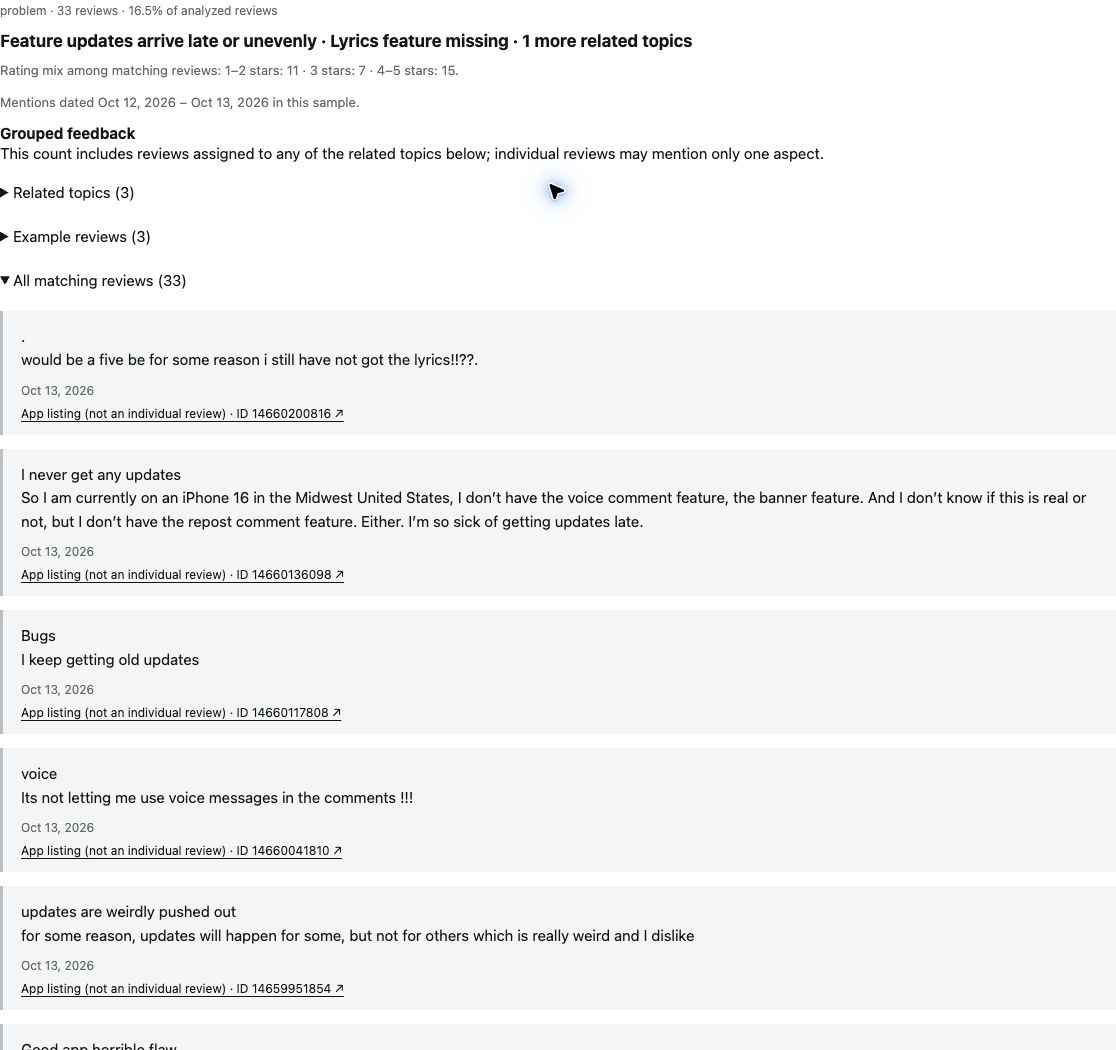
One saved report from a 200-review sample of a public app, captured October 20, 2026. This is what you would add next to an operations suite: a short list of themes, the reviews behind each one, and the count that produced it.
The top theme was “Feature updates arrive late or unevenly.” Thirty reviews were grouped under it. The public excerpt shows two selected reviews; it does not expose all 30 reviews in the theme.
What a supplement adds is the text, not another dashboard. You keep watching volume and replies where they already are, and read the sample here when a decision needs evidence rather than a number.
30 and 33 are different counts from the same saved report: the theme, and the wider group of related topics. They are not additive, and neither is a share of the app’s users.
Not a fit
When AppFollow is the better answer.
We are a one-job product. If most of your work is one of the four items below, adding a second tool costs more attention than it saves.
- Someone owns the reply queueReviews get answered, escalated or assigned. A report cannot send anything.
- ASO numbers drive the roadmapKeyword rank and search visibility are part of the decision, not a side report.
- You run a portfolio of appsThe question is cross-app, or about direction across a whole catalogue.
- You need a shared screenA dashboard several people open daily is a different product from a document you read once.
05 · Questions
The questions we get about this comparison.
Is this a full replacement for AppFollow?
No. ReviewFold covers one job — reading a recent sample of public reviews and keeping the evidence — and does not reply to reviews, track store keywords, or manage a portfolio. It is a supplement to an operations suite, or a cheaper way to answer a single question.
Can I import my AppFollow history?
There is no import. Every report starts from a public store link and reads a recent sample, so saved replies, dashboards and history stay where they are.
Can ReviewFold read a competitor’s reviews?
Yes, if the app’s reviews are public in a supported storefront. Paste the competitor’s store link and you get the same kind of report: themes, counts and the original reviews. Whether AppFollow exposes the same depth for competitors depends on your plan — that is question one in the checklist above.
How many reviews does one report cover?
Up to 200 of the most recent public reviews, for one app in one region. Supported stores today are the Apple App Store (US and Canada) and Google Play (US). Older reviews and other regions are outside the current sample.
What do I get before paying?
A free preview with the themes and their counts, plus a published example report you can read without an account. The full report — every theme, the reviews behind each one, PDF and CSV — is part of the paid plan.
What does it cost?
Price, report allowance and what the paid report includes are on the pricing page. We do not quote a number here because plan details change, and we do not quote AppFollow’s prices either — check their pricing page for the current figure.
Current support, stated plainly
- Apple App Store: US and Canada. Google Play: US.
- Up to 200 recent public reviews per report.
- One app and one region per report; no cross-region merge.
- One tracked app per subscription: daily check, tracking page and a Monday email.
- Free preview shows themes and counts with limited detail.
- The paid full report adds the excerpts, PDF and review CSV.
- No replies, keyword tracking, multi-app views or severity scores.
One question, one app
Test the analysis step without touching your suite.
Keep AppFollow for replies and keywords. Run one report on the app you are already discussing, and see whether the themes answer the question you brought.