 ReviewFold
Comparison · Appbot
An Appbot alternative for focused app review research
Need to understand a recent sample of reviews? ReviewFold groups recurring feedback and keeps the original excerpts close by. If your team needs a shared reply workflow or broader review operations, compare those requirements before switching.
This page is written by the team that builds ReviewFold. We are not an independent reviewer, and we did not run a hands-on test of Appbot’s current build. Appbot’s column summarizes Appbot’s own documentation; confirm packaging on appbot.co/plans before deciding.
- Stores
- App Store US/CA · Google Play US
- Sample
- Up to 200 recent public reviews
- Per report
- One app, one region
- Tracking
- One app, checked daily
- Reply workflow
- Not offered
- Keyword / ASO
- Not offered
These are current product limits, not roadmap items. A report reads public reviews for the app and region you submit. It does not read private analytics, customer support tickets, or reviews from other regions.
01 · Task coverage
The two tools overlap on one job, then stop.
Both can turn recent reviews into recurring themes. After that list exists, the products go in different directions: one continues into operations, the other stays with the evidence.
| Job to be done | AppbotReview operations | ReviewFoldReview research |
|---|---|---|
| Group recent reviews into recurring themesThe starting point for either tool. | Yes — documented on Appbot’s own product pages | Yes — one report, up to 200 recent reviews |
| Read the original review behind a themeNeeded to check whether a theme means what it looks like. | Yes | Yes — excerpts stay in the report |
| Reply to reviews from the tool | Part of Appbot’s product; packaging varies by plan | Not offered |
| Store keyword and ASO trackingNeither tool here covers it. ASO is a separate category of product, so this row is not a reason to switch. | No — Appbot reads keywords inside review text, not store rankings | Not offered |
| History and several apps in one view“Has this got worse?” needs stored history, not one sample. | Yes — compare plan limits for history | Saved reports stay in your account, and one app can be tracked daily; no multi-app or trend view |
| Export the result | Export options vary by plan | Full report: PDF and review CSV |
| See a real result before paying | Check the current trial terms | Free preview, plus a published example report |
Group reviews into themesThe starting point for either tool.
Job 1- Appbot
- Yes — documented on Appbot’s product pages
- ReviewFold
- Yes — up to 200 recent reviews per report
Read the original reviewTo check what a theme actually says.
Job 2- Appbot
- Yes
- ReviewFold
- Yes — excerpts stay in the report
Reply to reviews
Job 3- Appbot
- In product; packaging varies
- ReviewFold
- Not offered
Keyword and ASO tracking
Job 4- Appbot
- No — review keywords, not store rankings
- ReviewFold
- Not offered
History and multi-app view
Job 5- Appbot
- Yes — compare plan limits
- ReviewFold
- Saved reports plus one tracked app; no multi-app view
Export the result
Job 6- Appbot
- Varies by plan
- ReviewFold
- PDF plus review CSV
See a result before paying
Job 7- Appbot
- Check current trial terms
- ReviewFold
- Free preview and a public example
“Partial” means the capability exists but its availability depends on the plan or product surface, not that it is weak. Nothing here measures output quality, accuracy or speed. Sources: appbot.co, Appbot FAQs, Appbot plans, Appbot’s alternatives page. Reviewed Oct 31, 2026.
02 · What you give up
Three things you lose, and what to do instead.
A switch is only sensible if the loss is acceptable. Check these three trade-offs before switching, and decide how you would cover any work you still need.
Replying at volume
ReviewFold cannot send a reply. Keep Appbot for replies, or use the reply tools already included in App Store Connect and Play Console — both are free for your own app.
History and trends
A report describes one recent sample. If you need “what changed since March,” you need a tool that stores history, or your own saved exports.
Alerts and routed reviews
One tracked app sends a weekly email here. If reviews need to trigger an alert, land in Slack or Zendesk, or reach a support queue through an API, that routing stays with Appbot.
We list these losses because a comparison page that only shows wins is not useful for a purchase decision. If all three matter to you every week, staying with Appbot is the cheaper answer.
03 · A real result
What the report actually gives you.
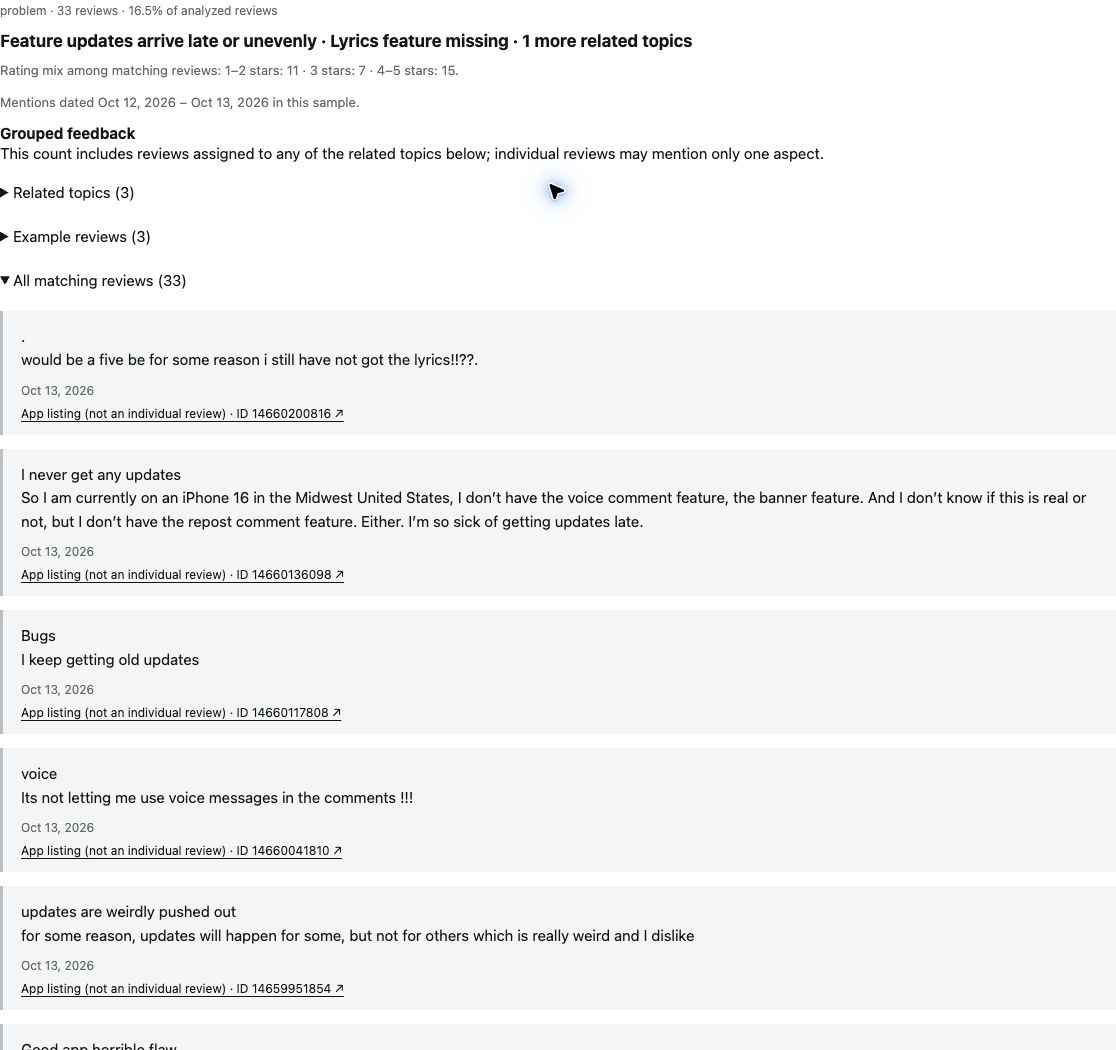
A saved ReviewFold report from a 200-review TikTok sample, captured October 20, 2026. This is the deliverable: a short list of themes, the reviews behind each one, and the count that produced it.
The top theme in this sample was “Feature updates arrive late or unevenly.” Thirty reviews were grouped under it. The public excerpt shows two selected reviews; it does not expose all 30 reviews in the theme.
The count tells you where to look. It does not tell you why updates arrive unevenly, whether it is a rollout problem or a store problem, or how many users are affected.
30 and 33 are different counts from the same saved report: the theme itself, and the wider group of related topics. They are not additive, and neither is a share of the app’s users. There is no severity score and no percentage here, because the sample cannot support one.
04 · Before you decide
Test the one job you actually have.
Do not evaluate a review tool by its feature list. Pick the app you are already arguing about, run it once, and see whether the output answers your question.
-
01
Paste one public store link
An App Store link for US or Canada, or a Google Play link for the US. One app, one region — that is the whole setup.
-
02
Read the free preview first
The preview shows the themes and counts, with limited detail. If the themes do not match the problem you have, stop there — that is already the answer.
-
03
Open the full report and read the excerpts
This is where the work happens: checking whether a theme means what it looks like. If you would not read the excerpts, a cheaper tool that only counts themes will do.
Not a fit
When Appbot is simply the better answer.
A comparison page that never says “stay” is a sales page. These are the cases where we would tell you to keep what you have.
- Replies are part of the jobSomeone on the team answers reviews weekly, or replies need an owner and a status.
- You manage several appsThe question is cross-app, or about the direction of a whole portfolio rather than one app’s recent feedback.
- You need history to make the call“Has this got worse since the last release?” needs stored history, not one recent sample.
- You ship on more than two storesReviewFold reads the App Store in the US and Canada, and Google Play in the US. Windows and Mac reviews fall outside it.
05 · Questions
The questions we get before switching.
Is this a full replacement for Appbot?
No. ReviewFold covers one job — understanding a recent sample of public reviews — and deliberately does not cover replies, team workflows, keyword tracking or long-term history. Treat it as a research tool that can sit alongside an operations tool, not as a migration target.
Can I import my Appbot history?
There is no import. Every report starts from a public store link and reads a recent sample, so past analyses and saved replies stay where they are.
How many reviews does one report cover?
Up to 200 of the most recent public reviews, for one app in one region. Supported stores today are the Apple App Store (US and Canada) and Google Play (US). Older reviews, other regions and other stores are outside the current sample.
Does ReviewFold reply to reviews, or follow an app over time?
It does not reply — there is no reply workflow and no inbox. For replying, use App Store Connect or Play Console, which are free for your own app.
It can follow one app. Paid plans include one tracked app: it is checked every day, new reviews are sorted into the themes already found, results appear on the tracking page, and you get one email each Monday. Tracking does not use your monthly reports. What it does not do is score severity or tell you whether a problem is getting worse.
What do I get before paying?
A free preview of the report with the themes and their counts, plus a published example report you can read without an account. The full report — with the reviews behind each theme, PDF and CSV export — is part of the paid plan.
What does it cost, and what is included?
Current price, report allowance and what the paid report includes are on the pricing page. We do not quote a price here because plan details change; the pricing page is the source we keep current.
Current support, stated plainly
- Apple App Store: US and Canada. Google Play: US.
- Up to 200 recent public reviews per report.
- One app and one region per report; no cross-region merge.
- One tracked app per subscription: daily check, tracking page and a Monday email.
- Free preview shows themes and counts with limited detail.
- The paid full report adds the excerpts, PDF and review CSV.
- No replies, keyword tracking, multi-app views or severity scores.
One app, once
Run it on the app you are already arguing about.
Paste a public store link and read the preview. If the themes do not match your question, you have learned that in two minutes and paid nothing.